what is vapor chamber cooling laptop?
I know many engineers who feel stressed when a laptop overheats during testing. I also faced the same problem in my early projects, and I remember how it slowed everything down.
Vapor chamber cooling in laptops is a flat phase-change heat spreader that removes heat fast from the CPU and GPU. It keeps the temperature more even across the base and helps the system stay stable during heavy workloads.
I want to show you how this cooling method works inside a laptop, because understanding it helps avoid many design mistakes and helps improve performance.
How do laptops integrate vapor chambers?
Many people feel confused when they first see a vapor chamber inside a laptop. It looks like a simple metal sheet, but the way it works in the system is very different from a normal plate. I also had this doubt when I first handled a gaming laptop teardown years ago.
Laptops integrate vapor chambers by placing them directly on the CPU and GPU, attaching them with thermal interface materials, and linking them to heat pipes or fin stacks to release heat.
How the vapor chamber fits inside the laptop
A laptop has limited space. Every millimeter matters. Designers need a wide heat spreader but cannot use thick blocks. The vapor chamber solves this because it is thin and flat. It sits on top of the CPU and GPU. It covers both chips at once in many gaming models. This large contact area helps balance heat.
The vapor chamber attaches using TIM pads or paste. These materials fill small gaps and help heat enter the chamber. Once the heat enters, the working fluid inside evaporates. The vapor spreads very fast, then condenses at cooler points.
How the heat leaves the chamber
Most laptops combine vapor chambers with heat pipes. This makes the system flexible. The vapor chamber spreads heat first. Then heat pipes carry the energy to fin stacks. Fans push air through these fins and blow the heat out.
Here is a simple table to show the path:
| Stage | Laptop Component | What Happens |
|---|---|---|
| Heat Entry | CPU / GPU + TIM | Heat enters chamber |
| Heat Spread | Vapor chamber | Vapor moves across plate |
| Heat Transfer | Heat pipes | Heat moves to fin stacks |
| Heat Release | Fans + fins | Hot air leaves laptop |
Why integration matters
The layout of a laptop decides how well heat can move. If the vapor chamber is too small, heat builds up. If the chamber contact is poor, the cycle becomes slow. If the heat pipes connect in the wrong place, the fans cannot remove energy fast enough.
I once helped a team redesign a thin-and-light laptop. They used a small copper plate before. The CPU hit 95°C in seconds. When we replaced the plate with a larger vapor chamber, the heat spread quickly. The fans had more time to react. The throttling reduced. The laptop became stable even under long workloads.
This is why vapor chambers fit well inside modern laptop designs. They maximize the limited space and help stabilize the whole cooling system.
Why do gaming laptops need vapor chambers?
I meet many people who wonder why gaming laptops almost always use vapor chambers now. They ask why simple copper plates or small heat pipes cannot handle the load. When I started working with gaming laptop builders, I learned the reason quickly.
Gaming laptops need vapor chambers because their CPU and GPU generate high heat density, and the chamber spreads that heat fast enough to keep performance stable during long gaming or GPU workloads.
Why gaming heat is harder to control
Gaming loads place extreme demand on both CPU and GPU. These chips work at high power for long periods. A normal copper block cannot spread heat fast enough. Heat piles up under the chip. This creates hot spots. Hot spots cause the system to throttle. Once throttled, the frame rate drops.
A vapor chamber spreads heat across a wider area. This gives the laptop more thermal headroom. The fans and fins handle the rest.
Key reasons gaming laptops adopt vapor chambers
Here is a simple comparison:
| Need | Why Vapor Chamber Helps |
|---|---|
| High power load | Large heat spreading surface |
| Long gaming sessions | Stable phase-change cycle |
| CPU + GPU heat mix | Shared base improves uniformity |
| Thin body designs | Chamber is thin and lightweight |
What I saw in real gaming laptop tests
I once supported a test for a gaming laptop that used only heat pipes. The GPU reached high temperature in minutes. The laptop throttled during a stress test. The performance dropped fast. When the team replaced the heat pipes with a vapor chamber module, the GPU temperature stayed lower. The frame rate stayed stable. The system ran smoother.
This showed me why gaming laptops need vapor chambers. The chamber balances heat, lowers peaks, and protects performance. It also helps the device stay comfortable for the user because the bottom panel becomes less hot.
Why old cooling designs no longer work
Older games used less power. Older CPUs and GPUs produced less heat. Today, gaming chips use more watts in smaller spaces. Many parts share one PCB. Without fast heat spreading, the system cannot keep up. Vapor chambers solve this by spreading heat instantly before it becomes a problem.
What benefits does laptop vapor cooling offer?
Many engineers know vapor chambers spread heat better, but they often ask what the real advantages are inside a laptop. I learned these advantages slowly as I worked with different laptop models. Some benefits are obvious. Some become clear only after long-term testing.
Laptop vapor cooling offers faster heat spreading, reduced hot spots, thinner profiles, more stable performance, and lower fan noise because the cooling system becomes more efficient.
Main benefits in simple terms
A laptop vapor chamber gives several practical benefits:
- It spreads heat faster than copper plates.
- It lowers the peak temperature.
- It reduces hot spots.
- It allows the laptop to stay thin and light.
- It helps fans work more efficiently.
- It stabilizes performance during heavy loads.
Detailed breakdown
1. Better heat spreading
The vapor inside the chamber moves quickly in all directions. When it reaches a cool surface, it condenses. This cycle is much faster than pure conduction. The result is a lower temperature difference across the surface.
2. More uniform temperature
A vapor chamber reduces temperature imbalance. This helps protect sensitive chips. Laptop boards often have parts close together. Heat balance becomes very important.
3. Thinner design
A chamber is thin. Designers use it to replace thicker heat blocks. This supports slim laptop shapes without losing cooling capacity.
4. Lower fan noise
When heat spreads well, fans do not need to run at maximum speed. In one project I worked on, the vapor chamber dropped fan noise by several decibels because the temperature stayed stable.
5. Longer lifespan
Batteries, SSDs, and VRMs suffer when hot spots appear. By reducing those hot spots, vapor chambers support longer part lifespan.
A deeper technical look
The chamber’s internal pressure allows the working fluid to evaporate at a low temperature. This is important for laptops because the temperature must stay under strict limits. The sealed cavity keeps the cycle efficient. The wick structure makes the return path smooth.
Here is a small table to show advantages clearly:
| Benefit | Real Effect |
|---|---|
| Fast spreading | Reduces heat peaks |
| High uniformity | Protects components |
| Thin design | Supports slim laptops |
| Better airflow synergy | Quieter fans |
| Stable performance | Longer high-load sessions |
All these advantages make vapor chambers one of the most helpful tools in modern laptop cooling.
Can vapor chambers reduce laptop throttling?
Many laptop users and engineers hope to reduce throttling. They try software tweaks, custom fan curves, and BIOS changes. But real throttling solutions start with hardware. I learned this from many stress tests across different laptop generations.
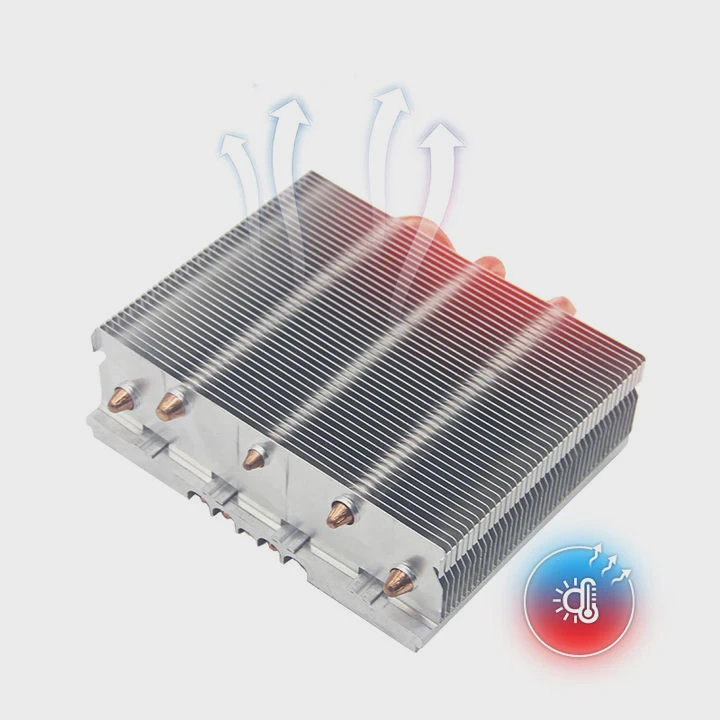
Yes. Vapor chambers reduce laptop throttling by spreading heat quickly across a larger surface, lowering peak temperatures, and giving the cooling system more room to keep the CPU and GPU within safe operating limits.
Why throttling happens
Throttling happens when a chip hits its temperature limit. When heat builds faster than it can escape, the CPU or GPU slows itself down. This protects the hardware. But it also hurts performance.
Thin laptops throttle more often because they have limited space for heat spreaders.
How vapor chambers help stop throttling
A vapor chamber lowers the hottest point under the CPU and GPU. This is the key. When the peak temperature drops, the system has more time before it reaches the limit. This reduces sudden throttling.
I saw this effect in a project where the CPU reached thermal limits within 30 seconds. After adding a vapor chamber, the CPU stayed below the limit for several minutes. The test result showed more stable clock speeds.
Why spreading heat matters more than removing heat
Some people think cooling is only about removing heat. But spreading heat is just as important. If heat stays in one small area, throttling happens quickly. By spreading heat, a vapor chamber buys time for the fans and fins to push heat out.
My experience with long stress tests
In a long stress test, I saw a laptop with no vapor chamber drop below base clock. The same model with a vapor chamber held boost clock longer. The chamber reduced the hot spot by more than 10°C. The performance gain was clear.
When a vapor chamber makes the biggest difference
A vapor chamber helps the most when:
- The laptop is thin
- The CPU and GPU share the same board
- The chip power is high
- The cooling module has limited space
- The fan system cannot ramp up fast enough
In these cases, even a small drop in peak temperature prevents major throttling.
Conclusion
A laptop vapor chamber spreads heat fast, reduces hot spots, supports thin designs, and keeps CPU and GPU performance stable. It helps reduce throttling and makes modern laptops handle heavy workloads more smoothly.
TAGS
Latest Articles

Volume discount levels for heat sink orders?
Buyers often ask when heat sink prices start to drop with volume. Many worry they’re overpaying for small orders. This guide explains how B2B volume pricing works for thermal components. Heat sink
21 Dec,2025
Heat sink long-term supply contract options?
Many buyers want stable pricing and reliable delivery for heat sinks. But without a clear contract, risks grow over time. This article explores how to secure better long-term supply deals. Long-term
21 Dec,2025
Tooling cost for new heat sink profiles?
Many engineers struggle to understand why tooling for custom heat sinks costs so much. They worry about budgeting and production timelines. This article breaks down the cost drivers behind tooling.
21 Dec,2025
Heat sink custom sample process steps?
Sometimes, starting a custom heat sink project feels overwhelming—too many steps, too many unknowns, and too many risks. You want a sample, but not endless delays. The process for requesting and
20 Dec,2025
Standard B2B terms for heat sink payments?
When buyers and sellers in B2B heat sink markets talk about payment, many don’t fully understand what’s standard. This can lead to delayed orders, miscommunication, and even lost business
20 Dec,2025
Heat sink pricing factors for large orders?
Heat sinks are vital for many systems. When prices rise, projects stall and budgets break. This problem can hit teams hard without warning. Large order heat sink pricing depends on many factors. You
20 Dec,2025Related Articles
- what is vapor chamber?
- what is a vapor chamber cooler?
- is vapor chamber cooling good?
- how vapor chamber works?
- how vapor chamber cooling works?
- how does vapor chamber cooling work?
- what is vapor chamber in phone?
- does iPhone 15 have vapor chamber?
- does iPhone 16 pro have vapor chamber?
- does iphone have vapor chamber cooling?
- what is vapor chamber cooling iphone?
- what is vapor chamber cooling system?
Author
Dr. Emily Chen
Chief AI Researcher
Leading expert in thermal dynamics and AI optimization with over 15 years of experience in data center efficiency research.
Categories
Latest Products






Recommend Categories
- Liquid cooling plate Manufacturer
- Industrial Heat Sink Manufacturer
- Standard Heat Sink Manufacturer
- Aluminum Heat Sink Manufacturer
- Copper Heat Sink Manufacturer
- Anodized Heatsink Manufacturer
- Stamping heat sink Manufacturer
- Die Casting Heatsink Manufacturer
- Soldering heat sink Manufacturer
- CNC Parts Manufacturer
Latest Products
- Wholesale Aluminum Radiator
- Water Cooling Plate Kit
- Water Cooling Heat Sink
- Water Cooling Heat Sink Kit
- Stainless Steel Water Distributor
- Server Water Cooling Plate Kit
- Server Liquid Cooling System
- Server Aluminum Cooling Kit
- S19 Full Cover Cooling Plate
- S19 Cooling Plate Kit
- S19 Aluminum Cooling Plate
Contact Expert
Have questions about this article? Reach out to our experts directly.