Do You Need Liquid Cooling to Overclock?
Overclocking can push your computer’s performance to the next level—but it also pushes heat generation to dangerous levels. Many users wonder if liquid cooling is required to keep things safe.
Liquid cooling is not strictly required for overclocking, but it provides far better thermal control and stability than air cooling, especially for sustained high-performance workloads.
While some moderate overclocks work fine with air coolers, serious overclocking demands efficient heat removal. Liquid cooling allows higher frequencies, lower noise, and better system stability.
What Is Overclocking?
Overclocking means running a computer component, such as a CPU or GPU, faster than the speed officially rated by the manufacturer. It’s a way to extract extra performance from existing hardware.
Overclocking is the process of increasing a processor’s operating frequency beyond its default settings to gain higher performance.
When a CPU or GPU runs at higher clock speeds, it performs more calculations per second. This can improve gaming frame rates, video rendering, or complex data computations. However, with higher speed comes higher heat generation, because the voltage and power draw also rise.
How Overclocking Works
A processor’s speed is controlled by its base clock (BCLK) and multiplier. When you increase either of them, the frequency rises.
For example:
| Parameter | Normal Setting | Overclocked Setting |
|---|---|---|
| Base Clock | 100 MHz | 100 MHz |
| Multiplier | 36x | 45x |
| CPU Frequency | 3.6 GHz | 4.5 GHz |
Most modern processors allow user-defined multipliers through BIOS settings or software tools. Some high-end motherboards include automatic tuning options that test voltage and frequency stability.
Why People Overclock
- To improve gaming performance.
- To speed up rendering or scientific workloads.
- To extend the usable life of older systems.
- To explore technical limits for benchmarking or hobby.
Overclocking can deliver noticeable performance boosts, but it also comes with risks. Unstable configurations can lead to crashes, data loss, or even hardware damage if not cooled properly.
Why Does It Increase Thermal Output?
When we overclock, we increase both the frequency and the voltage that power the CPU or GPU. This leads to higher energy consumption—and that energy turns into heat.
Overclocking increases thermal output because higher voltage and frequency raise electrical power dissipation inside the processor.
Understanding Power and Heat
The power consumed by a processor is roughly proportional to the square of the voltage and linearly proportional to frequency. The formula looks like this:
Power (P) ≈ C × V² × f
Where:
- C = capacitance (related to transistor design)
- V = operating voltage
- f = frequency (clock speed)
As frequency increases, processors often need more voltage to stay stable. That exponential increase in power leads to higher thermal output.
Example: CPU Power Scaling
| CPU Setting | Frequency | Voltage | Power (W) | Temp (°C) |
|---|---|---|---|---|
| Stock | 3.6 GHz | 1.1 V | 65 | 65 |
| Overclocked | 4.8 GHz | 1.35 V | 130 | 90 |
Even a modest voltage bump can double power consumption. Without adequate cooling, temperatures can exceed safe limits, causing throttling or permanent degradation.
Other Thermal Factors
- Leakage Current: At high voltage, more current leaks through transistors, creating extra heat.
- Inefficient Airflow: In tight cases, hot air may not be exhausted quickly enough.
- Ambient Temperature: Higher room temperatures limit cooling efficiency.
That’s why effective heat management is essential for stable overclocking. Otherwise, the CPU will throttle itself to prevent overheating, negating performance gains.
How Does Liquid Cooling Help Overclocking?
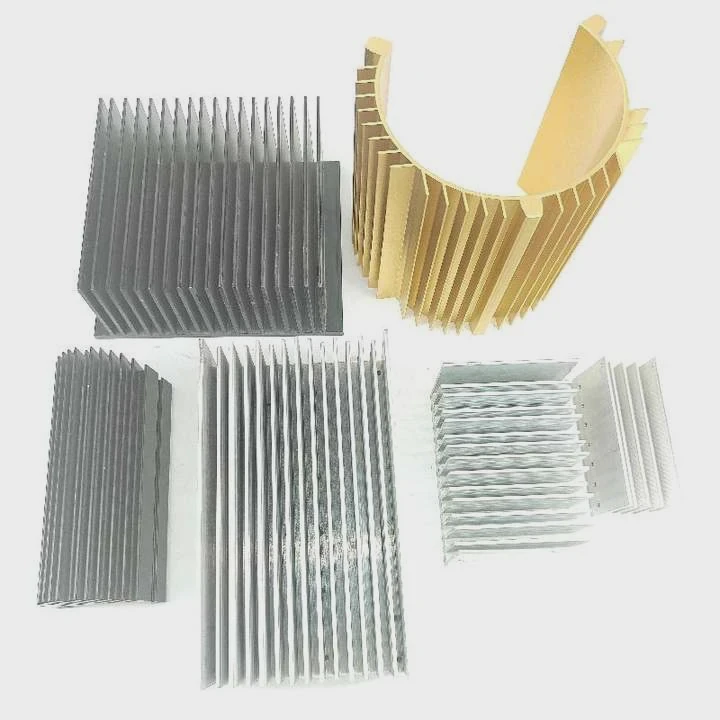
Air coolers rely on metal heat sinks and fans. Liquid cooling uses a circulating coolant to move heat away from the CPU or GPU more efficiently. This design offers higher thermal transfer capacity and better stability during extended workloads.
Liquid cooling helps overclocking by providing superior heat dissipation, lower noise, and stable temperatures under sustained high performance.
Advantages of Liquid Cooling
1. Higher Thermal Capacity
Water and specialized coolants have a much higher heat capacity than air. This allows liquid coolers to absorb and transport heat faster, keeping the processor below its maximum temperature.
2. Stable Operating Temperatures
During overclocking, heat output can spike suddenly. A liquid cooling system dampens these spikes, maintaining steady thermal conditions. This prevents temperature swings that could destabilize the CPU.
3. Lower Acoustic Noise
Because liquid systems use large radiators and slow-spinning fans, they can remove the same amount of heat with less noise. For high-performance PCs or workstations, this balance is critical.
4. Support for Continuous Loads
Air coolers often struggle during long stress tests or rendering tasks. Liquid coolers maintain consistent performance even under continuous 100% load.
Comparison: Air vs. Liquid Cooling
| Factor | Air Cooling | Liquid Cooling |
|---|---|---|
| Heat Dissipation | Moderate | Excellent |
| Noise Level | High under load | Lower |
| Maintenance | Low | Medium (periodic check) |
| Cooling Performance for Overclocking | Limited | Ideal |
| Cost | Lower | Higher |
My Experience with Overclocking and Liquid Cooling
When I built my first workstation for CAD rendering, air cooling worked fine for moderate tasks. But once I increased the CPU voltage for a 4.8 GHz overclock, temperatures shot past 95°C within minutes. After switching to a closed-loop liquid system with a 360mm radiator, full-load temperatures dropped to around 70°C, and stability improved dramatically. That’s when I realized how critical liquid cooling is for consistent performance.
Components of a Typical Liquid Cooling System
- Pump: Circulates the coolant through the loop.
- Water Block: Contacts the CPU or GPU to absorb heat.
- Radiator: Transfers heat from the liquid to the air.
- Fans: Move air through the radiator for cooling.
- Reservoir: Stores extra coolant and helps remove air bubbles.
Each component contributes to maintaining a stable and efficient thermal loop that keeps the overclocked hardware safe.
What Are the Safe Overclocking Trends?
Overclocking used to be a risky hobby for enthusiasts. Today, with better materials, sensors, and intelligent BIOS systems, it has become safer and more predictable.
Modern overclocking trends focus on automatic tuning, temperature monitoring, and smart power management to ensure safe, sustainable performance gains.
Trend 1: Precision Boost and AI Overclocking
New processors from Intel and AMD include self-regulating boost algorithms. These adjust frequency and voltage dynamically depending on cooling capability. AI-assisted systems can detect when thermal margins are available and apply safe overclocking automatically.
Trend 2: Enhanced Thermal Monitoring
Modern motherboards use multiple temperature sensors across the CPU, VRM, and coolant zones. Real-time data helps avoid overheating and prevents damage. Many systems also integrate thermal throttling mechanisms that limit frequency when necessary.
Trend 3: Hybrid Cooling Systems
Enthusiasts are moving toward hybrid solutions that combine air and liquid cooling—such as liquid-cooled GPUs with additional airflow fans. This provides both redundancy and flexibility in case of pump failure.
Trend 4: Safer Voltage Management
Instead of pushing voltage to extreme levels, modern overclocking practices favor efficiency tuning—achieving the best performance per watt. Many overclockers now use undervolting combined with frequency tuning for better thermals and longevity.
Trend 5: Thermal Paste and Material Innovation
New phase-change materials and liquid metal compounds enhance heat transfer between the processor and cooler. These materials can reduce temperature by up to 10°C compared to standard thermal paste.
Trend 6: Water-Cooling Customization and Monitoring
High-end setups now include digital flow meters, temperature probes, and leak sensors. Software dashboards track coolant temperature and flow rate, ensuring safe operation over long periods.
| Safe Overclocking Practice | Description | Benefit |
|---|---|---|
| Use AI tuning | Let motherboard optimize voltage/frequency | Prevents manual mistakes |
| Monitor temperature | Use software or sensors | Protects components |
| Apply moderate voltage increases | Avoid exceeding safe ranges | Extends lifespan |
| Test stability | Run stress tests after each adjustment | Ensures reliability |
| Maintain good cooling | Keep liquid systems serviced | Consistent performance |
Trend 7: Shift Toward Sustainability
As energy efficiency becomes more important, manufacturers focus on balancing performance and power consumption. The goal is not just raw speed but optimal performance-per-watt ratios.
My Personal Observation
In my latest PC build, I used AI-assisted overclocking with liquid cooling. The system automatically adjusted CPU multipliers within safe voltage limits, achieving a stable 15% boost while keeping temperatures below 75°C. It was the easiest and safest tuning experience I’ve had in over a decade.
Conclusion
Overclocking pushes hardware beyond its default limits, and that inevitably increases heat. While air cooling works for modest boosts, liquid cooling offers superior stability and performance for sustained overclocking. With modern automatic tuning and advanced cooling technologies, overclocking today can be both powerful and safe when managed correctly.
TAGS
Latest Articles

Volume discount levels for heat sink orders?
Buyers often ask when heat sink prices start to drop with volume. Many worry they’re overpaying for small orders. This guide explains how B2B volume pricing works for thermal components. Heat sink
21 Dec,2025
Heat sink long-term supply contract options?
Many buyers want stable pricing and reliable delivery for heat sinks. But without a clear contract, risks grow over time. This article explores how to secure better long-term supply deals. Long-term
21 Dec,2025
Tooling cost for new heat sink profiles?
Many engineers struggle to understand why tooling for custom heat sinks costs so much. They worry about budgeting and production timelines. This article breaks down the cost drivers behind tooling.
21 Dec,2025
Heat sink custom sample process steps?
Sometimes, starting a custom heat sink project feels overwhelming—too many steps, too many unknowns, and too many risks. You want a sample, but not endless delays. The process for requesting and
20 Dec,2025
Standard B2B terms for heat sink payments?
When buyers and sellers in B2B heat sink markets talk about payment, many don’t fully understand what’s standard. This can lead to delayed orders, miscommunication, and even lost business
20 Dec,2025
Heat sink pricing factors for large orders?
Heat sinks are vital for many systems. When prices rise, projects stall and budgets break. This problem can hit teams hard without warning. Large order heat sink pricing depends on many factors. You
20 Dec,2025Related Articles
- How to install Cooler Master liquid cooler?
- How to check liquid cooling?
- Do you need thermal paste for liquid cooling CPU?
- How to liquid cool your GPU?
- Where to install liquid cooler for best performance?
- How to build a liquid cooling system for PC?
- How much better is liquid cooling vs air cooling?
- Is Liquid Cooling Worth It for PC?
- How to set up a liquid cooling system?
- Where to buy liquid cooling parts?
- How to make an air-cooled engine liquid-cooled?
- How does liquid cooling CPU work?
Author
Dr. Emily Chen
Chief AI Researcher
Leading expert in thermal dynamics and AI optimization with over 15 years of experience in data center efficiency research.
Categories
Latest Products






Recommend Categories
- Liquid cooling plate Manufacturer
- Industrial Heat Sink Manufacturer
- Standard Heat Sink Manufacturer
- Aluminum Heat Sink Manufacturer
- Copper Heat Sink Manufacturer
- Anodized Heatsink Manufacturer
- Stamping heat sink Manufacturer
- Die Casting Heatsink Manufacturer
- Soldering heat sink Manufacturer
- CNC Parts Manufacturer
Latest Products
- Wholesale Aluminum Radiator
- Water Cooling Plate Kit
- Water Cooling Heat Sink
- Water Cooling Heat Sink Kit
- Stainless Steel Water Distributor
- Server Water Cooling Plate Kit
- Server Liquid Cooling System
- Server Aluminum Cooling Kit
- S19 Full Cover Cooling Plate
- S19 Cooling Plate Kit
- S19 Aluminum Cooling Plate
Contact Expert
Have questions about this article? Reach out to our experts directly.