does your ssd need a heatsink?
I often hear people ask why their SSD feels warm, and this worry grows when the drive slows down in the middle of work.
An SSD needs a heatsink when its temperature rises above safe limits during long tasks, heavy writes, or when airflow stays weak around the drive.
I want you to stay with me because SSD heat problems look simple on the surface, but they affect speed, lifespan, and stability.
What factors raise SSD temperatures?
I often see SSDs run well at first, then heat builds fast, and this change can surprise many people.
SSD temperatures rise mainly because of fast data transfers, dense chips, weak airflow, and crowded spaces inside the device.
How heat builds inside modern SSDs
When I look at any SSD, I see three main heat points. The controller chip makes the most heat. The NAND flash gets warm during active writes. The power chips add more heat during heavy loads. I learned this when I first tested a new NVMe drive on my bench. I watched the controller climb to 70°C in seconds during a large file copy. I placed my hand near it, and I could feel the warm air rise before the drive throttled.
Heat rises fast because the chips sit close to each other. They have small surfaces. Heat leaves slowly when the drive sits in a tight space. I show a simple view below:
| SSD Type | Heat Source Strength | Common Peak Temp |
|---|---|---|
| SATA SSD | Low | 40–55°C |
| NVMe PCIe 3.0 | Medium | 60–75°C |
| NVMe PCIe 4.0/5.0 | High | 70–95°C |
Why enclosure design matters so much
In many laptops, the SSD sits under a keyboard plate or near a warm CPU. Heat from the system moves into the SSD. The airflow stays weak. When I upgraded a thin laptop last year, I saw the SSD inside a small metal cage with almost no space for flow. During large installs, the drive hit its limit fast. When I opened the bottom cover, the temperature dropped by almost 10°C in less than a minute.
Why long tasks raise SSD heat
Heat builds when the drive works without breaks. Large game installs, OS updates, or long data transfers push every chip hard. The controller works non-stop. The flash cells move charge again and again. This heat has nowhere to go unless the drive has a heatsink or strong airflow. Slow airflow means heat stays in place, and the drive moves toward throttle points quickly.
Why do NVMe drives throttle more?
I often see people shocked when a fast NVMe drive suddenly slows down, even when it has no clear fault.
NVMe drives throttle more because they transfer data at very high speeds, which pushes the controller and flash chips to their thermal limits faster than older SATA drives.
A closer look at why NVMe runs so hot
NVMe uses PCIe lanes, and each jump in PCIe speed increases heat output. PCIe 4.0 and 5.0 drives write and read at extreme speeds. This creates heavy processing loads inside the controller. I often compare it to a small CPU without a fan. It works fast and gets hot fast.
When I tested a new PCIe 5.0 SSD for a long file copy, I saw the drive hit its thermal limit before reaching the end of the workload. The throttle curve looked sharp. One minute it ran at full speed. The next moment, it dropped by almost half because the controller reached its safe temperature limit.
Why NVMe controllers run hotter than NAND
The controller does more work than the flash cells. It manages queues, mapping tables, error checks, and caching rules. Many controllers run at 70–100°C during full load. Flash stays cooler, usually 40–70°C. But once the controller gets hot, the entire drive slows down.
Simple view of why NVMe needs more cooling
| Reason | Impact on Heat | Result |
|---|---|---|
| High PCIe speeds | Very high | Fast throttle |
| Dense chips | Medium | Hard to cool |
| Crowded slots | High | Slow heat removal |
| Long workloads | Very high | Sustained heat |
Why narrow M.2 slots make things worse
Many motherboards place the NVMe slot between a GPU and a CPU socket. I have seen drives heat up just because the GPU blows warm air over them. This confuses many people. They think the SSD heats itself. But the SSD also absorbs heat from nearby parts.
Can enclosure airflow cool SSDs enough?
Many people ask me if airflow alone can cool their SSD. I often say yes, but only when the airflow is strong and direct.
Good airflow can cool an SSD enough for normal tasks, but many systems do not push enough air toward the drive, so heat still builds under heavy loads.
How airflow interacts with SSD surfaces
Airflow works best when it moves across the main heat points. But SSDs have flat surfaces, and many are covered by labels or shielding plates. A label slows heat transfer. A shield helps sometimes, but it can trap heat if it has no vent path. When I removed a tight shield on a test unit, the temperature dropped at once. When I added airflow, it dropped even more.
How laptop airflow differs from desktop airflow
Laptops use narrow vents and tiny fans. Air passes through the CPU and GPU first. The SSD gets leftover airflow, which is warm and weak. In desktops, airflow is better, but many cases still have poor flow near M.2 slots. Many motherboards also place SSDs near hot components.
I once helped someone with a desktop that kept throttling during game updates. The case had strong front fans, but no air reached the SSD under the GPU. When we added a small side fan, the SSD temperature dropped from 85°C to 65°C under the same workload.
Does an enclosure change airflow ability?
An SSD inside a full external enclosure gets less fresh air. Some enclosures trap heat. Some include thermal pads. Some use metal shells as passive heatsinks. I tested a USB 4 enclosure recently, and the metal shell got very warm. This helped move heat away from the SSD. But inside, heat still stayed close until the full shell warmed up.
Below is a simple view:
| Enclosure Type | Cooling Style | SSD Temp Trend |
|---|---|---|
| Plastic shell | Weak | Temp climbs fast |
| Metal shell | Better | Steady but warm |
| Metal with pads | Strong | Lower temp overall |
| Vented shell | Very strong | Best flow |
Why airflow alone is not always enough
Airflow can help, but it cannot fix extreme workloads. If you push the SSD with long 4K edits or database work, the controller still reaches throttle points. Even with airflow, the heat builds faster than the air pushes it out.
Do heavy writes demand stronger cooling?
I often get this question from people who work with big files or run frequent backups.
Heavy writes demand stronger cooling because the controller and flash cells stay active without breaks, which builds heat faster than normal reading tasks.
Why writes heat up SSDs more than reads
When the drive writes data, the flash cells shift charge inside the material. This takes energy. It makes heat. Reads are lighter tasks. This is why write-heavy work warms the drive more.
I noticed this clearly when I tested a large game file transfer. The temperature climbed faster during writes than during reads. After only a few minutes, the controller hit its limit. I attached a small heatsink and ran the test again. The drive stayed cooler, and the throttle never hit.
What kinds of workloads count as heavy writes
Heavy writes happen during:
- large file copies
- database operations
- 4K video editing
- virtual machine work
- raw photo sets
- OS updates
- game installs
These tasks can last many minutes or hours. This keeps the SSD at high load for long periods.
Why caching tricks still produce heat
Many SSDs use SLC cache tricks to boost write speed. This looks fast at first. But as soon as the cache fills, the drive slows down. The controller works more. Heat grows. When I fill the cache repeatedly, I see heat grow even faster.
Why stronger cooling changes real performance
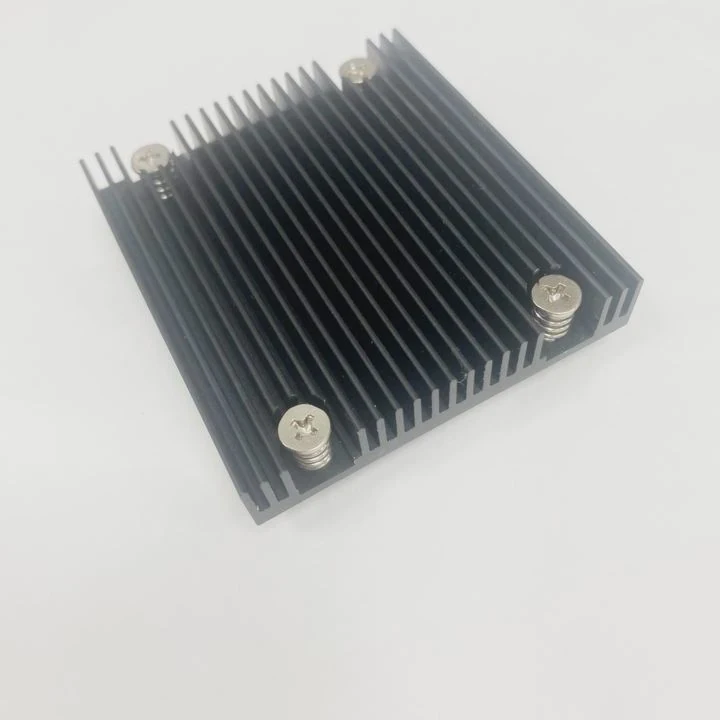
A heatsink spreads heat across a larger surface. Airflow removes heat from that surface. This simple combination keeps the controller below throttle limits. Once the controller stays cool, the drive runs at full speed longer.
A simple view of cooling vs heavy writes
| Work Type | Heat Load | Cooling Needed |
|---|---|---|
| Light reads | Low | Airflow only |
| Mixed tasks | Medium | Airflow + thin heatsink |
| Heavy writes | High | Full heatsink |
| Continuous work | Very high | Heatsink + strong airflow |
Conclusion
Your SSD does not always need a heatsink, but it often benefits from one during long tasks, heavy writes, and weak airflow conditions. When heat stays low, the SSD runs faster, lasts longer, and works with better stability.
TAGS
Latest Articles

Volume discount levels for heat sink orders?
Buyers often ask when heat sink prices start to drop with volume. Many worry they’re overpaying for small orders. This guide explains how B2B volume pricing works for thermal components. Heat sink
21 Dec,2025
Heat sink long-term supply contract options?
Many buyers want stable pricing and reliable delivery for heat sinks. But without a clear contract, risks grow over time. This article explores how to secure better long-term supply deals. Long-term
21 Dec,2025
Tooling cost for new heat sink profiles?
Many engineers struggle to understand why tooling for custom heat sinks costs so much. They worry about budgeting and production timelines. This article breaks down the cost drivers behind tooling.
21 Dec,2025
Heat sink custom sample process steps?
Sometimes, starting a custom heat sink project feels overwhelming—too many steps, too many unknowns, and too many risks. You want a sample, but not endless delays. The process for requesting and
20 Dec,2025
Standard B2B terms for heat sink payments?
When buyers and sellers in B2B heat sink markets talk about payment, many don’t fully understand what’s standard. This can lead to delayed orders, miscommunication, and even lost business
20 Dec,2025
Heat sink pricing factors for large orders?
Heat sinks are vital for many systems. When prices rise, projects stall and budgets break. This problem can hit teams hard without warning. Large order heat sink pricing depends on many factors. You
20 Dec,2025Related Articles
- What direction does the blow Intel heatsink E97381?
- how to remove 2010 mac pro heatsink?
- How to TO-220 heatsink bolt?
- how to remove top mount cpu heatsink?
- how to remove cpu fused to heatsink?
- how well do heatsink style coolers work?
- where to find double heatsinks battletech?
- How to connect a heatsink to 7805 regulator?
- what is the main obsticle when using heatsinks?
- do heatsinks work on m.2 drive?
- how to install heatsink to transistor?
- does dead cpu fan imply dead or damaged heatsink?
Author
Dr. Emily Chen
Chief AI Researcher
Leading expert in thermal dynamics and AI optimization with over 15 years of experience in data center efficiency research.
Categories
Latest Products






Recommend Categories
- Liquid cooling plate Manufacturer
- Industrial Heat Sink Manufacturer
- Standard Heat Sink Manufacturer
- Aluminum Heat Sink Manufacturer
- Copper Heat Sink Manufacturer
- Anodized Heatsink Manufacturer
- Stamping heat sink Manufacturer
- Die Casting Heatsink Manufacturer
- Soldering heat sink Manufacturer
- CNC Parts Manufacturer
Latest Products
- Wholesale Aluminum Radiator
- Water Cooling Plate Kit
- Water Cooling Heat Sink
- Water Cooling Heat Sink Kit
- Stainless Steel Water Distributor
- Server Water Cooling Plate Kit
- Server Liquid Cooling System
- Server Aluminum Cooling Kit
- S19 Full Cover Cooling Plate
- S19 Cooling Plate Kit
- S19 Aluminum Cooling Plate
Contact Expert
Have questions about this article? Reach out to our experts directly.