How to change liquid cooling?
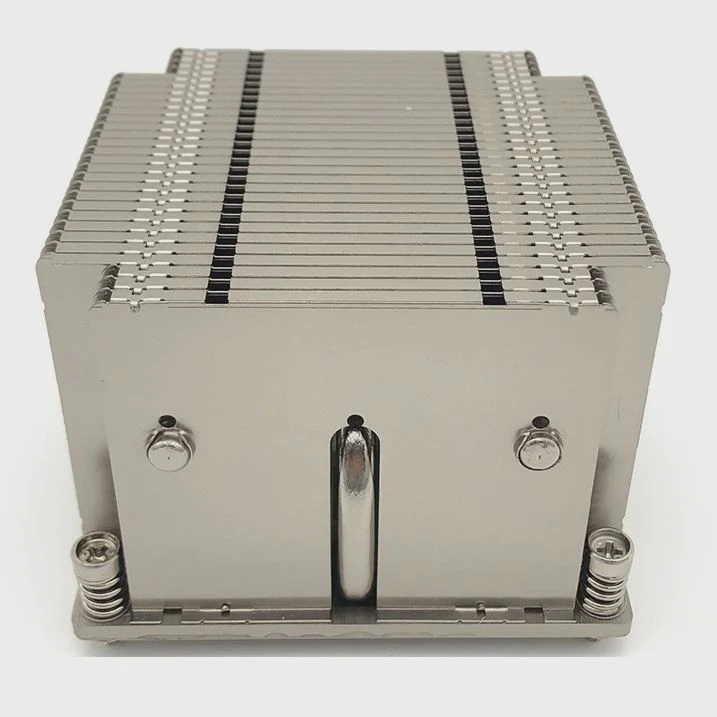
Sometimes, computer or equipment cooling systems stop working efficiently. You may notice higher temperatures, fan noise, or unstable performance.
You can change liquid cooling by draining old coolant, cleaning the loop, and refilling it with fresh liquid while checking all fittings and seals.
Changing liquid cooling is essential for keeping systems stable and long-lasting. If done properly, it can restore full performance and prevent hardware damage.
When should you replace liquid cooling?
Over time, coolant degrades, and the system collects dust or corrosion. This leads to slow heat transfer and weak cooling results.
You should replace liquid cooling every 12 to 24 months or when you see signs of leaks, noise, or temperature spikes.
Key signs of replacement need
There are several clear signs that tell you when to replace a liquid cooling system:
| Symptom | Possible Cause | Action |
|---|---|---|
| CPU or GPU temperature increases | Coolant degradation | Flush and refill |
| Strange noises in pump | Air bubbles or low liquid level | Check and refill |
| Visible leaks or residue | Tube or fitting damage | Replace parts |
| Rust or discoloration | Corrosion in loop | Clean or change components |
Why replacement timing matters
Regular replacement helps prevent buildup inside the loop. If you wait too long, corrosion may start inside the radiator or water block. This will reduce performance and make the system harder to clean. In industrial systems or servers, this can also mean production downtime. Replacing liquid cooling on time avoids these risks.
I remember one client who delayed maintenance for more than three years. When we opened the system, the coolant had turned brown, and flow was almost blocked. The pump had to work twice as hard, causing vibration and damage. After a complete change, the system ran 8°C cooler with less noise.
What are the benefits of replacing it?
A well-maintained liquid cooling system can last for years, but fresh coolant and components can still make a big difference.
Replacing liquid cooling brings better performance, longer hardware life, and improved system reliability.
Performance improvement
When coolant is new and free of impurities, heat transfers more efficiently. Components stay cooler, and fans spin slower. This means quieter operation and less energy use.
Longer hardware life
Clean coolant prevents corrosion, which can damage pumps and radiators. The system works under less stress, and internal seals remain flexible. Over time, this reduces the chance of leaks and hardware failure.
Cost efficiency
Some users think replacing coolant is expensive. In fact, it saves money in the long run. For example:
| Maintenance Type | Frequency | Cost (approx.) | Benefit |
|---|---|---|---|
| Coolant refill | 1–2 years | Low | Keeps system stable |
| Pump change | 3–5 years | Medium | Extends lifespan |
| Full system upgrade | 5+ years | High | Boosts performance |
By planning a maintenance schedule, you avoid emergency repairs and unexpected downtime.
Cleaner appearance and peace of mind
A clean loop not only works better but also looks more professional. For custom PC builds or display equipment, this visual appeal is important. Many of my customers say the simple act of replacing the coolant gives them confidence the system will last another few years.
How to change the system step-by-step?
When it’s time to change your liquid cooling, follow a simple and safe process.
To change the liquid cooling system, power off the unit, drain the coolant, clean the components, and refill the loop with new fluid while checking for leaks.
Step 1: Power off and prepare
Turn off all power and unplug the system. Place towels or absorbent pads under your workspace. Prepare tools such as screwdrivers, tubing, and a funnel.
Step 2: Drain the coolant
Open the drain valve or disconnect the lowest tube in the loop. Let the old coolant flow out into a container. Make sure to dispose of it safely.
Step 3: Disassemble and clean
Remove water blocks and radiators carefully. Rinse them with distilled water. For deep cleaning, use a mix of vinegar and water to remove buildup, then rinse again.
Step 4: Reassemble and inspect
Reconnect the parts tightly. Check all fittings and seals. Replace O-rings if they look dry or cracked.
Step 5: Refill and bleed air
Pour new coolant into the reservoir. Tilt the system slowly to remove trapped air. Run the pump without powering other components until no bubbles appear.
Step 6: Test and monitor
Turn on the full system and monitor temperature for at least 30 minutes. Watch for leaks and listen for unusual noises.
Common mistakes to avoid
- Using tap water – it leaves minerals that cause corrosion.
- Ignoring air bubbles – trapped air reduces cooling efficiency.
- Skipping seal checks – even small leaks can cause big damage.
- Over-tightening fittings – can crack acrylic blocks or tubing.
Maintenance routine
To keep performance stable, check your coolant level every 3–4 months. Replace filters or tubes if you see residue. Keep a maintenance log; it helps you track patterns and predict future issues.
What are the new trends in modular cooling?
Technology in liquid cooling is changing fast. Modern systems focus on flexibility, performance, and sustainability.
The new trends in modular cooling include quick-connect systems, eco-friendly coolants, integrated sensors, and hybrid heat exchange modules.
Quick-connect fittings
These fittings let you swap components without draining the whole loop. It saves time during upgrades or maintenance. Many industrial clients now use this feature to replace faulty pumps in minutes instead of hours.
Smart monitoring and IoT integration
Modern systems use sensors for temperature, flow rate, and pressure. Data is displayed in real time on dashboards or mobile apps. Some even send alerts when coolant levels drop or when leaks are detected. This reduces maintenance time and prevents accidents.
Eco-friendly coolants
Manufacturers are moving toward non-toxic and biodegradable coolants. They perform as well as traditional glycol-based fluids but have less environmental impact. In some industries, using green coolant is already part of certification requirements.
Hybrid heat exchange modules
These combine liquid cooling with heat pipes or vapor chambers. The result is faster heat transfer and lighter weight. For example, aluminum vapor chamber modules used in 5G and electric vehicles achieve up to 5000 W/m·K thermal conductivity, nearly 100 times higher than solid aluminum blocks.
Modular design for scalability
In large systems, modular design allows flexible expansion. You can add extra cooling loops or radiators without redesigning the entire setup. This approach is popular in data centers, EV battery systems, and aerospace electronics.
Comparison of traditional vs modular cooling
| Feature | Traditional System | Modular Cooling |
|---|---|---|
| Maintenance | Manual and time-consuming | Quick-connect, easy access |
| Scalability | Fixed design | Expandable modules |
| Monitoring | Basic sensors | IoT and smart dashboards |
| Coolant Type | Glycol or alcohol mix | Eco-friendly or phase-change fluid |
| Application | PCs, small machines | Data centers, EVs, aerospace |
Personal observation
When I first switched from a classic loop to a modular design, I noticed how easy it was to make upgrades. A client in the energy sector adopted modular cooling for their inverter systems. They cut maintenance time by 40% and saw a clear improvement in temperature stability. Now, modular cooling is not just for enthusiasts—it’s becoming standard in industrial applications.
Conclusion
Changing liquid cooling is not complicated, but it requires care and consistency. Replacing coolant on time keeps systems clean, stable, and efficient. With the rise of modular and smart technologies, maintaining these systems is easier and more reliable than ever.
TAGS
Latest Articles

Volume discount levels for heat sink orders?
Buyers often ask when heat sink prices start to drop with volume. Many worry they’re overpaying for small orders. This guide explains how B2B volume pricing works for thermal components. Heat sink
21 Dec,2025
Heat sink long-term supply contract options?
Many buyers want stable pricing and reliable delivery for heat sinks. But without a clear contract, risks grow over time. This article explores how to secure better long-term supply deals. Long-term
21 Dec,2025
Tooling cost for new heat sink profiles?
Many engineers struggle to understand why tooling for custom heat sinks costs so much. They worry about budgeting and production timelines. This article breaks down the cost drivers behind tooling.
21 Dec,2025
Heat sink custom sample process steps?
Sometimes, starting a custom heat sink project feels overwhelming—too many steps, too many unknowns, and too many risks. You want a sample, but not endless delays. The process for requesting and
20 Dec,2025
Standard B2B terms for heat sink payments?
When buyers and sellers in B2B heat sink markets talk about payment, many don’t fully understand what’s standard. This can lead to delayed orders, miscommunication, and even lost business
20 Dec,2025
Heat sink pricing factors for large orders?
Heat sinks are vital for many systems. When prices rise, projects stall and budgets break. This problem can hit teams hard without warning. Large order heat sink pricing depends on many factors. You
20 Dec,2025Related Articles
- Is liquid cooling better for CPU?
- Is liquid or air cooling better?
- Which is better, air cooling or liquid cooling?
- Is PC Liquid Cooling Worth It?
- How to Maintain Liquid CPU Cooler?
- What liquid is used in a liquid cooling system?
- How to use liquid cooling?
- Is liquid cooling high maintenance?
- How to know if liquid cooling is working?
- What happens to a liquid when it cools?
- How Does a Liquid-Cooled Computer Work?
- Is 120mm Liquid Cooling Enough?
Author
Dr. Emily Chen
Chief AI Researcher
Leading expert in thermal dynamics and AI optimization with over 15 years of experience in data center efficiency research.
Categories
Latest Products






Recommend Categories
- Liquid cooling plate Manufacturer
- Industrial Heat Sink Manufacturer
- Standard Heat Sink Manufacturer
- Aluminum Heat Sink Manufacturer
- Copper Heat Sink Manufacturer
- Anodized Heatsink Manufacturer
- Stamping heat sink Manufacturer
- Die Casting Heatsink Manufacturer
- Soldering heat sink Manufacturer
- CNC Parts Manufacturer
Latest Products
- Wholesale Aluminum Radiator
- Water Cooling Plate Kit
- Water Cooling Heat Sink
- Water Cooling Heat Sink Kit
- Stainless Steel Water Distributor
- Server Water Cooling Plate Kit
- Server Liquid Cooling System
- Server Aluminum Cooling Kit
- S19 Full Cover Cooling Plate
- S19 Cooling Plate Kit
- S19 Aluminum Cooling Plate
Contact Expert
Have questions about this article? Reach out to our experts directly.